
RTX 3060 vs RTX 3060 Ti
The complete head-to-head: full specs, real per-game FPS with 1% lows, ray tracing, a live CPU-bottleneck check, thermals, power and value, with a straight verdict.
GeForce RTX 3060
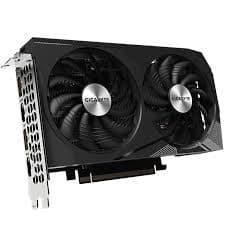
GeForce RTX 3060 Ti
avg, 1080p
The short answer
Same generation, same core architecture, genuinely different cards. The RTX 3060 Ti is about 30% faster on average thanks to 1,280 more CUDA cores and a wider 256-bit bus, and it actually edges out the 3060 on used-market dollars per frame despite costing more. The 3060 answers with 12 GB of VRAM against the Ti's 8 GB, which matters at 1440p, for local AI work, and for long-term texture headroom. Neither has DLSS 3 or an AV1 encoder, both are pure Ampere.
These two share an Ampere heart but come from opposite ends of the same GA10x lineup: the RTX 3060 uses the smaller GA106 die tuned for high VRAM at a lower price, the RTX 3060 Ti uses the bigger GA104 die tuned for raw speed. Both launched within a few months of each other in late 2020 and early 2021, and both are still common, affordable used buys in 2026.
The full spec table follows, ten-game frame rates built around a 1440p Cyberpunk 2077 frametime chart, ray tracing numbers, a CPU-pairing checker, thermal and power readings, price history for both since their late-2020 and early-2021 launches, and a verdict weighing GA104's extra cores against GA106's extra VRAM.
At a glance
Seven dimensions, two cards. Bigger area is not automatically better, each card owns different corners.
Strengths radar
Each axis scored 0-100 relative to the pair
Performance vs price
Up and to the left is better value
Grey dots are neighbouring cards for context.
Which should you buy?
Pick your use case, the winner changes with what you actually do.
More CUDA cores and a wider 256-bit bus give the Ti a real, felt speed advantage at both resolutions.
The extra 4 GB avoids the stutter and 1%-low drops the 8 GB Ti can hit at higher settings in newer titles.
12 GB fits bigger models and batches than the Ti's 8 GB, memory capacity beats raw speed for local AI work.
Faster raw throughput means quicker exports and more headroom for encoding while gaming, though neither has AV1.
At 170 W against the Ti's 200 W, the 3060 is the gentler pick for a modest PSU and a tighter thermal budget.
448 GB/s of bandwidth over a 256-bit bus edges out the 3060 in the most demanding high-resolution emulation cores.
Already own an RTX 3060? The Ti is a real, if modest, upgrade.
Short answer: probably not
A 30% average gain is worth considering if you're chasing smoother 1440p or higher frame rates at 1080p, and the used-market pricing on the Ti has come down enough that it's now a genuinely competitive $/frame buy, not just a raw-speed premium.
If VRAM capacity matters more to you than speed, either for 1440p texture headroom or local AI work, skip the Ti and keep the 3060's 12 GB instead. A real upgrade beyond the Ti is an RTX 4070 or a used RTX 3070, both a clear step further up.
Full specification comparison
Every spec side by side. The highlighted figure wins each row.
| Specification | RTX 3060 | RTX 3060 Ti |
|---|---|---|
| Architecture | ||
| GPU / architecture | GA106 · Ampere | GA104 · Ampere |
| Process node | Samsung 8 nm | Samsung 8 nm |
| Release date | Feb 25, 2021 | Dec 2, 2020 |
| Launch MSRP | $329 ▲ | $399 |
| Compute | ||
| CUDA cores | 3,584 | 4,864 ▲ |
| RT cores | 28 · 2nd gen | 38 · 2nd gen ▲ |
| Tensor cores | 112 · 3rd gen | 152 · 3rd gen ▲ |
| Base / boost clock | 1320 / 1777 MHz ▲ | 1410 / 1665 MHz |
| L2 cache | 3 MB | 4 MB ▲ |
| Memory | ||
| VRAM | 12 GB GDDR6 ▲ | 8 GB GDDR6 |
| Memory bus | 192-bit | 256-bit ▲ |
| Bandwidth | 360 GB/s | 448 GB/s ▲ |
| Power & form factor | ||
| TDP | 170 W ▲ | 200 W |
| Power connector | 1× 8-pin | 1× 8-pin |
| Suggested PSU | 550 W ▲ | 600 W |
| PCIe interface | 4.0 ×16 | 4.0 ×16 |
| Features | ||
| Upscaling | DLSS 2 / Super Res | DLSS 2 / Super Res |
| AV1 encode (NVENC) | No | No |
| Display outputs | 3×DP1.4a · HDMI 2.1 | 3×DP1.4a · HDMI 2.1 |
Average FPS by game
Switch resolution, metric, ray tracing and upscaling, the bars update live. Hover a bar for the avg / 1% / 0.1% breakdown.
Average FPS · 1080p · Rasterization. Representative data, hover a bar for avg / 1% / 0.1%. Note the RTX 3060 Ti's 1% lows fall off at 1440p and up from its 8 GB VRAM.
Smoothness & frametimes
Average FPS hides stutter. This is one run plotted as frametime, a flat line is smooth, spikes are hitches. Watch what the RTX 3060 Ti's 8 GB VRAM does in a texture-heavy game.
Frametime: Cyberpunk 2077, 1440p Ultra
Lower and flatter is better · 16.7 ms = 60 fps
Counterintuitive but real: the slower RTX 3060 delivers a smoother line here because 12 GB holds the texture pool the 8 GB RTX 3060 Ti keeps evicting, those spikes are VRAM stutter, not raw speed.
Lab scores
Clean apples-to-apples tests, useful, but weaker at predicting real games than the FPS above.
Ray tracing & upscaling
Ray tracing tanks both cards at native resolution. What makes it playable is upscaling, and here the RTX 3060 Ti has a real edge.
Is frame generation "real" performance?
Neither card supports DLSS 3 Frame Generation, that feature arrived with the RTX 40 series. Both the 3060 and 3060 Ti are limited to DLSS 2 and Super Resolution upscaling, which sharpens a lower-resolution render up rather than inserting new AI-made frames.
For either card, use DLSS 2 Quality mode as a free performance boost with minimal visual cost, and Balanced or Performance mode only when you're chasing high refresh rates and can tolerate a softer image. Without Frame Generation on either side, the fps gap between them shows up directly, unfiltered by any AI smoothing.
Will your CPU bottleneck these cards?
A faster GPU only helps if your CPU keeps up. Pick your CPU and resolution to see expected FPS and bottleneck for each card.
CPU + GPU pairing check
The willitbottleneck engine, built right into the comparison.
Estimated from a 43-CPU model across 1440p. A weak CPU mostly bites at 1080p; at higher resolutions the GPU becomes the limiter and the bottleneck shrinks.
Thermals & noise
The efficiency gap shows up here: the newer card runs cooler and quieter, day in and day out.
Real draw, efficiency & PSU
TDP is the rated figure; what matters is real gaming draw and how many frames you get per watt.
Both use a single 8-pin connector. If your PSU already ran the RTX 3060, it will run the RTX 3060 Ti easily. Leave about 30% headroom for spikes.
Will it fit, and what to pair it with?
Size to scale
Card length matters for small cases
What monitor to pair
RTX 3060: comfortable at 1080p 144 Hz or 1440p 60-100 Hz. RTX 3060 Ti: handles 1440p 100-144 Hz well, and is a genuinely strong 1080p 165 Hz+ card. Neither is intended for 4K, though the Ti copes with occasional 4K in lighter titles better.
Running an older PCIe 3.0 board?
Both cards run a full PCIe 4.0 ×16 link, so there's no bottleneck on a modern board, and minimal loss on an older PCIe 3.0 system either.
Price history & dollars-per-frame
Raw price is only half the story. Cost per frame is the number that decides it, and it keeps moving as prices fall.
New price over time
Street price of new cards (USD)
The 12 GB vs 8 GB question
RTX 3060 · 12 GB
- 12 GB on a 192-bit bus holds up better at 1440p and in texture-heavy games than the Ti's 8 GB.
- Local AI and Stable Diffusion work benefits directly from the extra capacity, fitting bigger models and batches.
- Large Blender and Resolve scenes stay on-card longer before spilling into system RAM.
- The extra memory doesn't make up for having 1,280 fewer CUDA cores, the Ti is still clearly the faster card overall.
RTX 3060 Ti · 8 GB
- The wider 256-bit bus and 448 GB/s of bandwidth partly offset the smaller 8 GB capacity.
- 8 GB still covers the large majority of 1080p and most 1440p titles today.
- Texture-heavy 2026 AAA titles at 1440p ultra can push past 8 GB, where the 3060 pulls ahead.
- It's a poor fit for serious local AI or large creator scenes, where the 3060's 12 GB wins outright.
Emulation & memory bandwidth
The narrower bus is a real downgrade for emulation
High-resolution emulation leans on both bandwidth and capacity. The 3060 Ti's 448 GB/s edges out the 3060's 360 GB/s, and that raw speed advantage wins out in most emulators including upscaled Switch cores and RPCS3. The 3060 only pulls ahead in the handful of memory-hungry titles that genuinely fill past 8 GB at high internal resolutions.
Creator, AI & streaming
The newer card is quicker per task, but the older card's extra VRAM unlocks larger jobs it can't fit at all.
Streaming: the AV1 encoder is the differentiator
Neither card has a hardware AV1 encoder, that arrived with the RTX 40 series. Both rely on NVENC's 7th-generation H.264 and HEVC encoder, which is still solid for streaming and recording, just less efficient than AV1 at matching bitrates. The encode quality difference between the two is negligible, pick based on gaming performance instead.
Overclocking & undervolting
Neither card has dramatic overclocking headroom left, both were already tuned close to their limits at launch. The bigger win on either is undervolting, similar performance at lower temperature and noise, and the 200 W Ti benefits the most from it.
Pros & cons
RTX 3060
- 12 GB VRAM on a 192-bit bus, ahead of the Ti's 8 GB for the long run
- Lower 170 W draw, and runs cooler and quieter
- Cheaper both new and used
- About 30% slower on average
- Narrower 192-bit bus and less bandwidth than the Ti
RTX 3060 Ti
- Meaningfully faster, about 30% ahead on average
- More bandwidth (448 GB/s) and more RT and Tensor cores
- Better $/frame on the used market despite the higher price
- Only 8 GB VRAM, a real ceiling at 1440p ultra with big texture packs
- 200 W draw runs a bit hotter and louder
Buying pitfalls
Which RTX 3060 are you buying?
The 3060 exists in two forms: the common 12 GB, 192-bit card used here, and a later 8 GB model on a cut 128-bit bus that trails by up to about 17%. Check the listing for 12 GB / 192-bit before buying.
No laptop RTX 3060 Ti exists
NVIDIA never released a mobile RTX 3060 Ti, the Ti suffix in the 30-series lineup is desktop-only. If you're comparing laptop GPUs, the mobile RTX 3060 is a different, weaker chip than its desktop namesake, don't cross-reference the numbers on this page for a laptop.
RTX 3060 vs RTX 3060 Ti: your questions answered
For raw speed, yes, it's about 30% faster on average and even edges out the 3060 on used-market dollars per frame. The exception is memory: the 3060's 12 GB beats the Ti's 8 GB for 1440p texture headroom and local AI work.
Buy the Ti for pure gaming speed at 1080p or 1440p, it's the better all-round performer and now often the better value too. Buy the 3060 if you specifically need the extra VRAM for 1440p ultra textures, emulation edge cases, or local AI and creator work.
Yes. It remains a genuinely capable 1080p and 1440p card, and its 448 GB/s of bandwidth keeps 1% lows solid even in newer, more demanding titles. It lacks DLSS 3 and AV1, but the raw performance is still relevant.
It's a reasonable, if modest, upgrade if you want smoother 1440p or higher 1080p frame rates and don't need the extra VRAM. For a bigger jump, an RTX 4070 or used RTX 3070 is a more decisive step.
The RTX 3060, thanks to its 12 GB of VRAM against the Ti's 8 GB. Local AI and large 3D scenes are limited by memory capacity more than raw speed, so the 3060 fits bigger models and batches despite being the slower card overall.
The RTX 3060 Ti's higher raw throughput means quicker exports and more headroom while gaming and encoding at once. Neither card has a hardware AV1 encoder though, that's an RTX 40-series feature, so streaming quality is essentially tied between them.
It does. Both use 2nd-generation RT cores, but the Ti simply has more of them (38 vs 28), giving it roughly a 30% ray tracing advantage that tracks with its overall raster lead.
No. Both are Ampere cards, so they get DLSS 2 Super Resolution upscaling only. DLSS 3 Frame Generation is locked to the RTX 40 series and later, so neither one here can use it.
It's the reverse concern at this tier, a weak CPU can bottleneck either card, mostly at 1080p. Use the pairing checker on this page, a Ryzen 5 5600 or Core i5-12400F and up keeps both cards fed comfortably at 1440p.
Yes, moderately. The RTX 3060 draws 170 W against the Ti's 200 W, which means lower temperatures and a few dBA less noise under load. Both idle silently with fan-stop enabled.
A step up, not a leap: a quality 550 W unit covers the 3060 and 600 W covers the Ti, each on a single 8-pin connector. A 600-650 W supply leaves comfortable headroom for either.
Somewhat. Most 3060 cards run around 242 mm and 2-slot, while 3060 Ti AIB cards often run larger, around 268 mm and 3-slot, check your case's maximum GPU length either way. Both use a full PCIe 4.0 ×16 link with no meaningful loss on older PCIe 3.0 boards.
No. There's a mobile RTX 3060, but NVIDIA never made a mobile RTX 3060 Ti, the Ti naming in the 30-series is desktop-only. Never compare a laptop RTX 3060's numbers against this desktop page.
Only in lighter or older titles, both are 1080p-to-1440p cards at heart. The Ti handles occasional 4K a bit better thanks to its extra bandwidth and raster speed, but neither should be bought with 4K as the target resolution.
The Ti, at around $230 used it's currently the best pure value in this pair, it beats even the cheaper 3060 on dollars per frame. Buy with a return window and avoid untested ex-mining cards regardless of which model you pick.
No, they're on equal footing. Both use the same Ampere architecture with full Game Ready driver support well into the future, so neither is an end-of-life concern for a 2026 purchase.